Write to us from the window. The reply comes back to it.
Settings › Help › Contact support… sends your question — in English, please — with the window's log and a description of the machine, so we can usually answer in one go. The reply arrives in Reclaim, marked by a red count on the gear, and by email if you gave an address.
Reclaim says a folder is 40 GB; Explorer says 12. Which is right?
Both, usually. The difference is data several files share — ReFS block clones, hard links — and every copy shows its full size in a folder listing. The status bar says how much is shared between copies, and Measure on disk… on the folder reports what its files really occupy. Deleting one such copy frees nothing while another remains.
I deleted something and the free space did not change.
If it went to the Recycle Bin, the space comes back when the bin is emptied. If it was quarantined (Pro), quarantine is a move, not a delete: the bytes stay on the disk until the batch is purged, and nothing is purged on its own. And if the files were hard links or clones, see the question above.
The numbers do not update by themselves.
They do on a volume with a change journal — NTFS keeps one; a ReFS volume can be given one with Keep this volume current…. A volume without one is a snapshot that Refresh brings up to date. If the status bar says without the service, the Reclaim service is not running: enable it in services.msc or reinstall.
I paid, and Reclaim says Free edition.
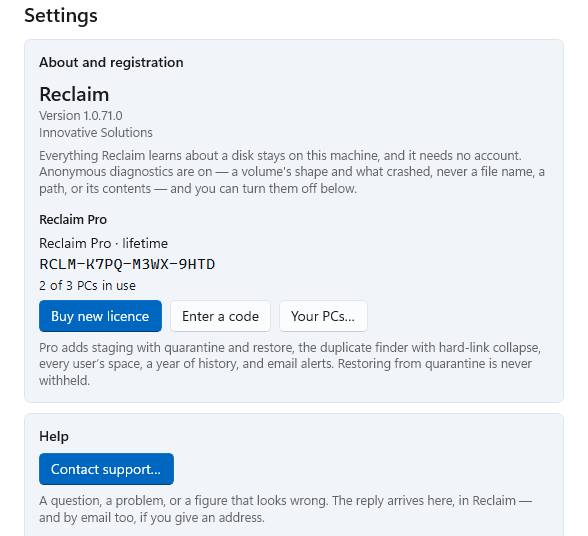
Almost always the licence is on a different PC than the one you are looking at, or on a different email address than the one you wrote from. Enter the code from your email under Settings › Reclaim Pro › Enter a code. If it says all three PCs are in use, free one under Your PCs on any licensed PC — or write to us with the code.
Where is my code?
In the email from the purchase, and under Settings › Reclaim Pro on any licensed PC. A code looks like RCLM-XXXX-XXXX-XXXX; the letters O, I, L and U and the digits 0 and 1 are never used. Lost the email? Have it sent again — to the address you bought with, and nowhere else.
What does Reclaim send anywhere?
Nothing about your files. Anonymous diagnostics — a volume's size and filesystem, and what crashed — go out by default and can be turned off in Settings; a file name, a path or a file's contents never do. A support request carries the window's log and a description of the machine, and it says so before you send it. The one thing that leaves on purpose is Compare with another PC: the top level of the folder on screen — names, sizes, counts — to the PCs on your own licence and nobody else, on a button, listed before it goes.
Compact… on a WSL disk closed my Linux terminals.
It has to. A WSL disk can only be compacted while nothing has it open, so Compact stops every distribution and Docker Desktop's engine for a moment — it says so on the card before you press. Nothing inside the disk is touched; what you get back is the space Linux had freed inside and never handed back to Windows. Start the distribution again afterwards.
Does Reclaim delete restore points or shadow copies?
No. The card under the map shows how much they hold; the button opens Windows' own System Protection page, which knows how to remove them safely.
Can I get a refund?
Yes, within 30 days of the purchase, for any reason. Write to us from the window with the order reference from your receipt or the email you paid with; the payment goes back through 2Checkout to the card you paid with, usually within a few days. Your licence is withdrawn when the refund goes through.
Lost your code?
Every code bought with an address can be sent to that address again — and to nowhere else, so the form cannot tell anybody what we hold. If a licence has ended, its code comes too: renewing brings it back.
Reclaim 1.0.72
Reclaim-Setup-1.0.72.0.msi · 126 MB · SHA-256 7ac46722
Installed copies update themselves. Reinstalling over an existing copy keeps your settings, your licence and your history.