One window, one live index, and findings you can check.
Reclaim runs in two parts. The window is yours and runs with your rights. The service holds the index, runs as the system, and is read-only by construction — it has no message that writes, moves or deletes. Everything below follows from that.
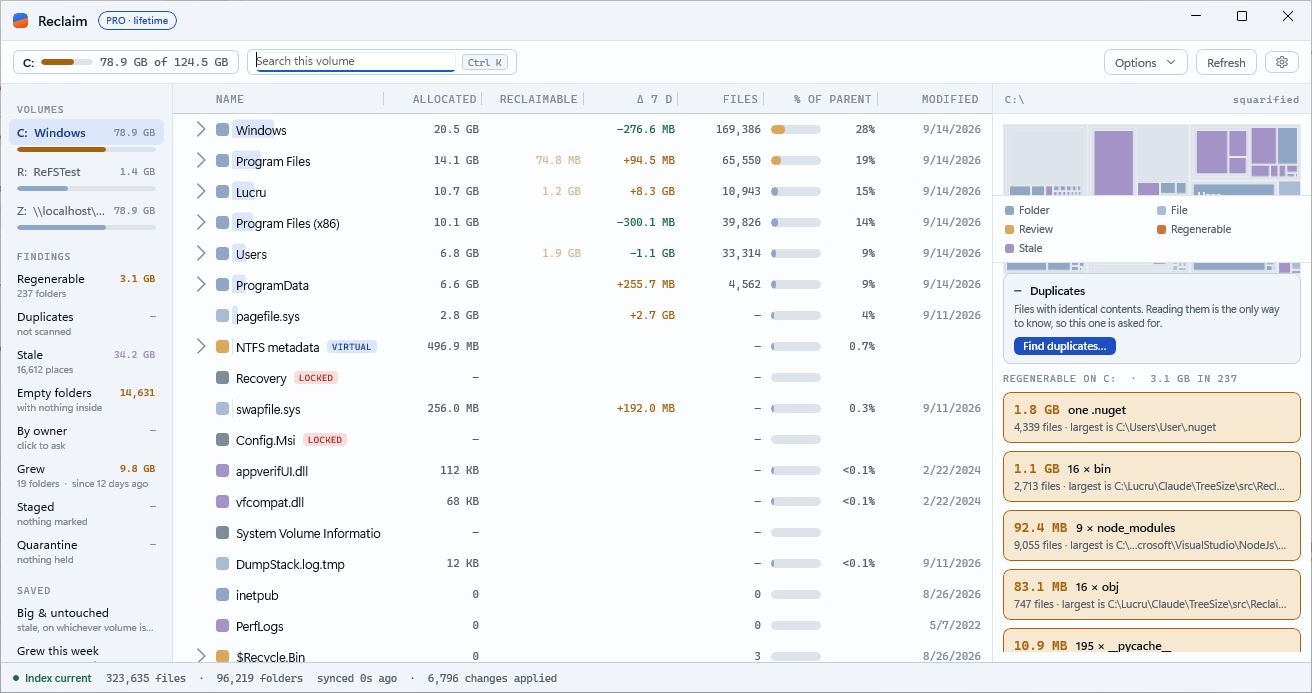
Volumes, findings, the tree, the map
The title bar carries the mark, the name and the Pro pill — what this copy is, in one badge: PRO · until a date, amber inside the renewal window, PRO · lifetime, TRIAL · 9 days left, or Get PRO; it opens the licences window. Under it the volume with its capacity, the search box (Ctrl+K), and Options — sort, view, Size / Allocated, Compare dates…, Time-lapse…, Retention rules…, Compare with another PC…, Find duplicates…, Find similar photos and videos…, Export — beside Refresh and the gear.
A left rail with your volumes and their capacity — mapped network drives included, and on hover the disk behind each letter as it reports itself: model, health, temperature, wear, hours, with a red mark for trouble — then FINDINGS and SAVED views. The tree with a colour square, a band showing each row's share, and monospace figures. A squarified treemap that follows the selection, with the shadow-copies and duplicates cards under it.
Badges say what a row is: outside the folder tree, behind an ACL (the size is a lower bound), still being read, regenerable. Basic view turns them off.
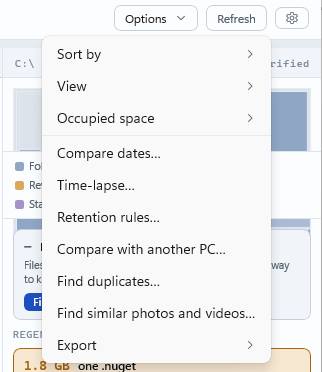
One menu for the things you set once and leave: how the tree is sorted, Basic / Tree / Tree + Map, whether figures are Size or Allocated, the dates the Δ column compares, the time-lapse, your retention rules, the other PC to compare with, the two duplicate scans, and export to CSV or the clipboard.
Seven columns, each with a definition
Numbers you can argue with. When the folders add up to more than the volume has in use, the status bar says how much is shared between copies, and Measure on disk… on any folder reads its files to report what they really occupy.
The files' logical length, or what they occupy on disk — clusters, compression, sparse files. One switch, every figure.
What the regenerable folders inside a row add up to. Not "deletable" — only what rebuilds from something already on the disk.
Growth against the snapshot from seven days ago. Reclaim writes a snapshot of every folder over 64 MB each day the volume is open. With Pro, Compare dates… makes the column any two days — the head reads 28 AUG–8 SEP — and the Grew card and list follow.
How many files are anywhere inside.
The row's share of the folder above it, with a share track drawn behind it.
The newest write anywhere inside, not the folder's own timestamp.
Data several files claim — ReFS block clones, NTFS hard links. Deleting one copy frees nothing while another remains.
What the volume has in use that no folder accounts for — restore points, folders you cannot list, files held open — read from the disk's own allocation map and shown as one stated row at the root, with the arithmetic on hover. Below a per cent it is metadata, and not a row.
Which bytes you may stop paying for
Sorting by size tells you where the bytes are. It never tells you which ones you are allowed to stop paying for. Each finding is one line on the rail; clicking it puts what it found in the tree as ordinary rows.
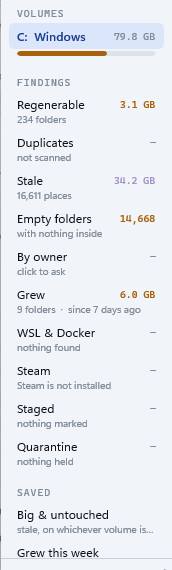
node_modules, .venv, __pycache__, bin/obj beside a .csproj, target beside Cargo.toml — nineteen names believed outright, nine only with a witness file beside them. Counted once, however deep. A git checkout's .git counts too when the remote holds all of it — every branch pushed, nothing stashed — so a fresh clone would bring it back; one with local-only work is left alone.
Size buckets, a 64 KB head hash, then a full SHA-256. Asked for, never automatic. On a set: stage the extra copies, or link them to one file so every path stays and the data is stored once. On ReFS each set says what deleting the extras would really free — five clones of one file free nothing, and the set says so.
Off the newest-write roll-up, so a folder counts as stale only when nothing anywhere inside it has changed.
The outermost folder of each empty tree, so removing it takes the whole tree.
Seven days of history free; a year with Pro, and Compare dates… to set both ends. Grew this week is a saved view.
Read from the file table itself — including profiles Windows will not let an administrator open.
Read from Steam's own library files. The games as folder rows named by the game, how many have not been played in a year, and Uninstall through Steam… on a game's menu — Steam's own confirmation, never a delete under its feet.
Every distribution's ext4.vhdx and Docker Desktop's disks: a file Linux fills and never gives back to Windows. A running distribution says what it uses inside; the gap is the slack. Compact… (Pro) shuts WSL down for a moment, compacts the file under Windows' own consent, and says what it gave back — measured.
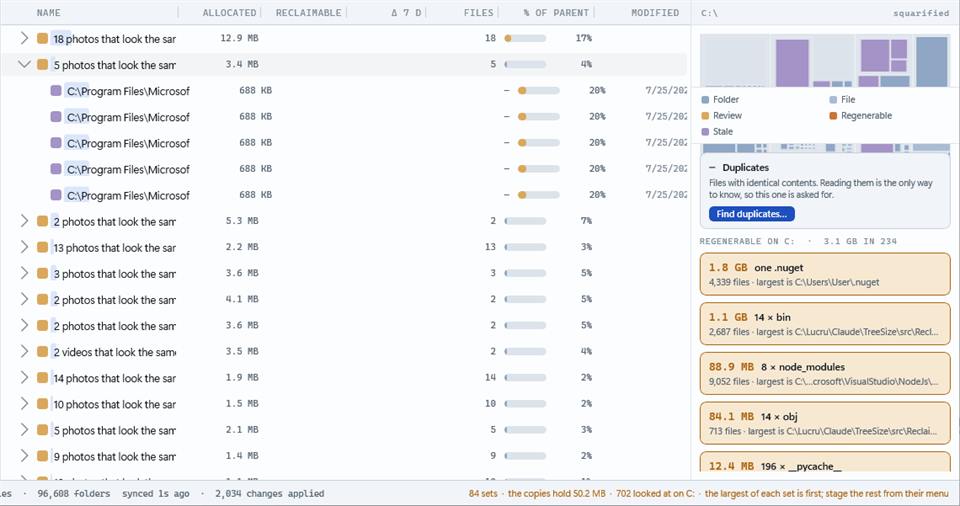
Not byte-identical — alike. Each photo's thumbnail, and a frame of each video, reduced to a nine-by-eight grey and difference-hashed; sets by how few bits differ. The largest of each set is first as the one to keep; the copies are ordinary rows to stage.
On the card under the map. Reclaim never deletes them; the button opens Windows' own System Protection page.
Plus any of your own: where the tree is, how it is sorted, which measure it shows.
Five colours that mean something checkable
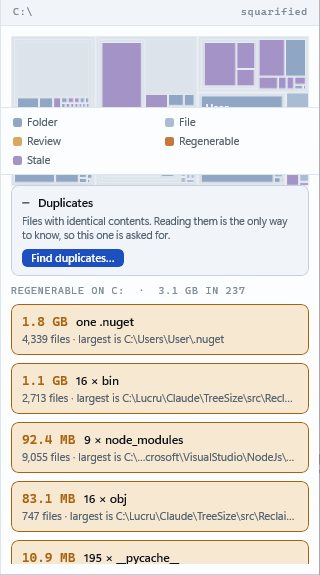
Folder, file, review (the recycle bin and the virtual row), regenerable, and stale. Nothing here recommends a delete; the colour picks a fill, and the cards under the map name the largest regenerable folders with their file counts.
Acting on what you find
Right-click a row: Stage for removal, Move to Recycle Bin, Delete permanently…, Show in Explorer, Measure on disk…. Click, Ctrl+click and Shift+click select several; the total counts only the outermost items, so nothing is counted twice.
Reclaim refuses to delete Windows, Program Files, ProgramData, your profile, NTFS's own records and the page, hibernation and swap files, and cautions for anything inside them. Before deleting it resolves the path from the index and back again — a record that now names something else is refused.
Staging (Pro): mark now, decide later. Quarantine moves a batch aside on the same volume — instant, all or nothing — and keeps it 14 days. It frees nothing until you purge, nothing is ever purged on its own, and put it back restores. Restoring is never behind the licence.
The things you would otherwise do by hand, again
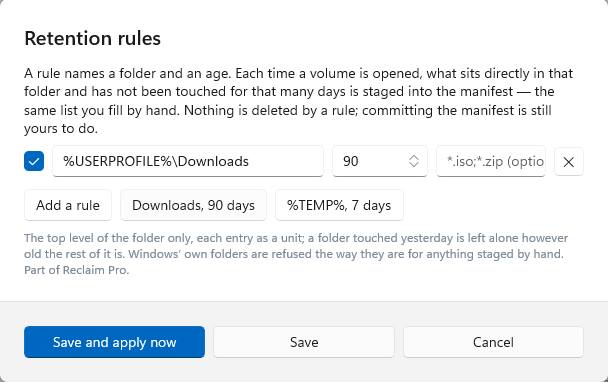
Retention rules (Pro) — a folder, an age, an optional pattern: Downloads, 90 days; %TEMP%, 7 days. Each time a volume is opened, what sits directly in that folder and has not been touched that long is staged into the manifest with the rule as the reason — the same list you fill by hand. Nothing is deleted by a rule; committing the manifest is still yours to do, and Windows' own folders are refused the way they are for anything staged by hand.
Time-lapse (Pro) — the daily snapshots as a treemap, one day per slider step, Play at 700 ms. Each day is drawn from that day's snapshot alone: the folders over the floor at the size they had then. A folder that appears crossed the floor that day; one that vanishes went under it, or away.
Compare with another PC (Pro) — the same folder on two PCs of your licence, name by name, largest difference first. The folder on screen publishes its top level — path, names, sizes, file counts, said before it goes — to your licence's own PCs and nobody else; the other PC's listing is fetched by the same right. One folder at a time, on a button.
Similar photos and videos (Pro) — see Findings above: 702 pictures looked at in ten seconds on the machine that took the screenshot, 84 sets.
A journal, not a scan
NTFS keeps a change journal; Reclaim follows it. ReFS is walked, and kept live once the volume has a journal — one button creates it. Volumes without one are a snapshot that Refresh brings up to date. Without the service at all, the window still works, reading each volume itself with your own rights.
The journal is being followed. Files created, deleted or resized show up within about a second.
No change journal on this volume. A picture taken when it was read; Refresh reads it again. Keep this volume current… creates a journal on ReFS.
The index was released to give memory back. Nothing is lost; opening a folder reads it again.
Folder by folder, as you. What you could not open in Explorer is not counted, and nothing updates until Refresh.
A mapped drive — Z: \\server\share — is on the rail and read as you, the way Explorer sees it, by the window's own copy of the service. Local volumes stay on the installed one.
NTFS live. ReFS live with a journal — Dev Drive the same. FAT32 and exFAT as a snapshot: findings, stale, empty and duplicates all answer; no owners, there being no file table. A BitLocker volume as the filesystem underneath, once unlocked; locked, it is off the rail and says so. USB sticks and SD cards as their filesystem; unplugging one releases its index. Mapped network drives as a snapshot, read with your own rights.
The disk behind each letter, as it reports itself: model, kind, health, temperature, wear, hours, uncorrected errors, the failure prediction — on the rail chip's hover, with a red mark for trouble, and as reclaim disks. Checked every hour; an email when a disk predicts failure, and a full disk is the smaller problem. A virtual disk says "healthy" and nothing more, and the tip says so rather than reading zero as fine.
Explorer, Settings, support
Scan with Reclaim sits on a folder's right-click menu with the folder's size in the item, and opens the window rooted at that folder. On Windows 11 it is on the main menu; on Windows 10, on the menu.
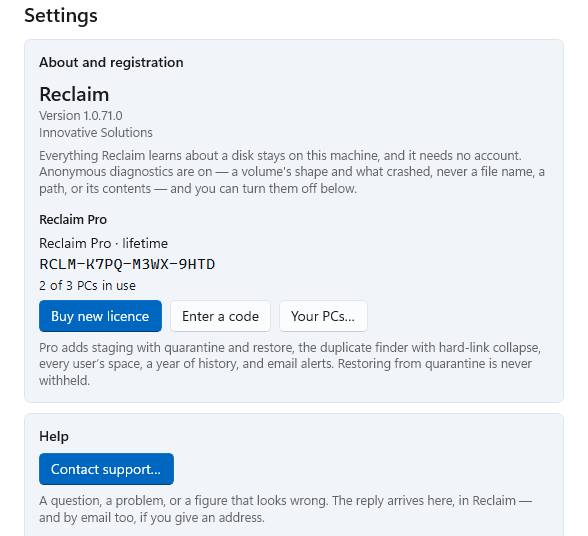
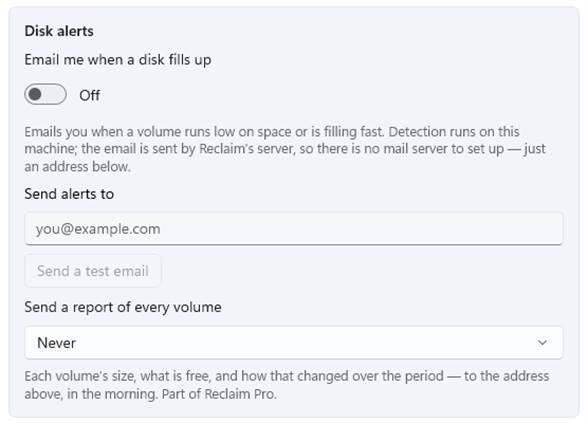
Settings is four cards: About and registration — your Pro status and code with Buy new licence or Buy more time, and the PCs on your licence by name; Help; Disk alerts — the switch, the address, Send a test email so you see what an alert looks like before a disk fills, and the scheduled report; and Other — language, theme, the Explorer switch, anonymous diagnostics (on by default; never a file name or a path) and the log folders.
When the trial ends, one closable bar under the command bar says so, once: the date, what keeps working free, what is in Pro — and, only when true, that what you removed is still held in Quarantine and restoring it is never withheld, and that your alerts have stopped. No ribbon, no nagging: Free is an edition, not probation.
The report (Pro): every week on Monday or every month on the 1st, an email with each volume's size, what is free and how that moved over the period — "fills in about 40 days" where it is falling — from the same hourly readings the alerts use.
Help is a conversation: Contact support… sends your question with the window's log and a description of the machine, and the reply arrives in the window — a red count on the gear — and by email if you give an address.
The same engine on every server, reporting to one console
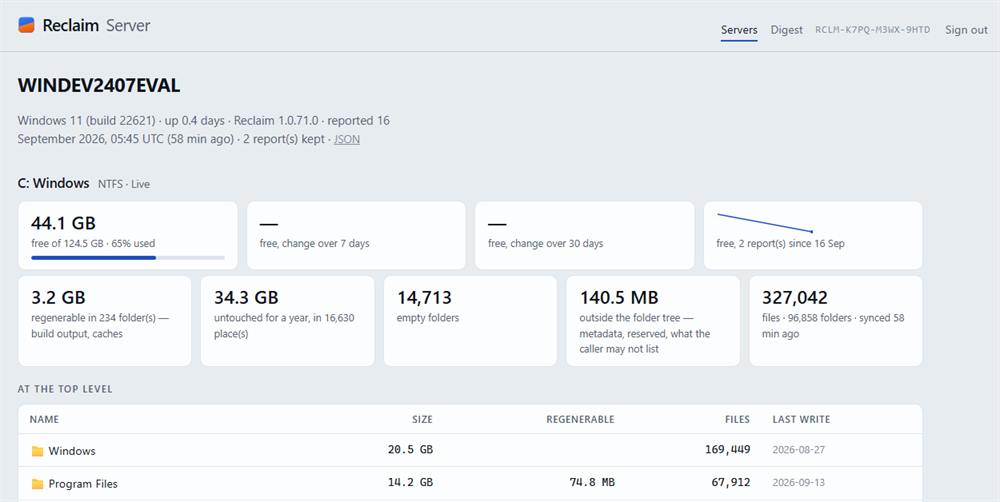
A person with several Windows servers wants to know, without signing in to each, what is on them, what is free, what is growing, what could go, and whether a disk is about to fail — and wants it delivered. Reclaim Server is that: the same read-only service and live index on every server, a daily document from each to one place, a console that shows the fleet and each server, and a digest by email on a schedule.
Nothing is read from a disk that the window could not already read. What is new is that the reading leaves the machine — once a day, on purpose, to your licence's own page and nobody else's: per volume the size, what is free, what the tree adds up to, the counts, the regenerable, stale and empty totals, the dozen largest things at the top level, the accounts holding the most, and the disks as they report themselves. Not file names below the top level, not paths, not contents.
No account. The licence code is the identity, as it is for your PCs: what licensed the servers opens the page about them. Prices and how to put a server on it →
msiexec /i Reclaim-Setup.msi /qn HEADLESS=1 installs the engine — service, command line, updater — without the window. The ordinary install works too, on a server with a desktop.
reclaim licence RCLM-XXXX-XXXX-XXXX claims a seat; reclaim config email=… alerts=on report=week sets what Settings would; reclaim report shows the document, --send sends it now, --json for scripts.
Opened with the code. Every server on the licence, reporting or not — last report, volumes, free with a bar, the change over seven days, regenerable, stale, disk trouble, version. One server's page: per volume the figures with sparklines and 7- and 30-day changes from a hundred days of kept documents, the top level, By owner, the disks.
One email per licence, every Monday or every 1st: one block per server — free space, the change over seven days, regenerable, stale, disk trouble. Cadence and address are set on the Servers page.
Under 10% or 25 GB free, filling fast, or a disk predicting failure — an email from the same hourly check, to the address you gave the server.
For the parts you repeat
Every new install has fourteen days of everything. When the trial ends, Reclaim continues free and the status bar says so once. A code — RCLM-XXXX-XXXX-XXXX — covers three PCs, and there is no account anywhere.
See pricesStaging with the manifest, quarantine and restore — and retention rules that fill it
Duplicates — the finder and hard-link collapse, and similar photos and videos
By owner — every user's space
History — a year instead of seven days, Compare dates… and the time-lapse
Email alerts when a disk is under 10%, filling fast or predicting failure, and a weekly or monthly report
Compare with another PC, Compact a WSL or Docker disk, and the command line — tree, search, findings, duplicates, owners, stale, regenerable, shadows, disks, each with --json