See what is using your disk — and which bytes you are allowed to stop paying for.
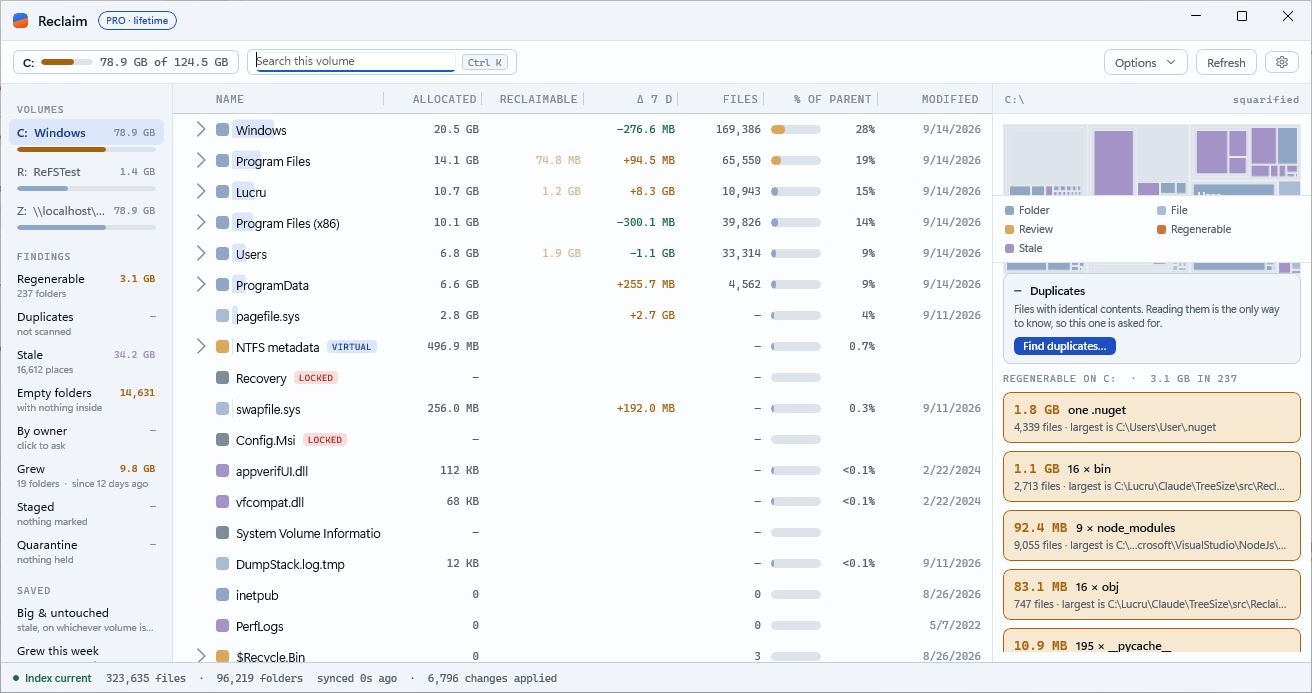
Reclaim reads the volume's own file table once and then follows the change journal. Every folder size is current within a second, without a scan, and every finding says what it is: build output, duplicates, a year untouched.
Free, no account · 126 MB signed installer · Windows 10 (2004+) / 11, 64-bit
Current within a second
NTFS keeps a running record of every change. Reclaim follows it, so a file created, deleted or resized shows up in the tree without re-reading anything. The first read happens once.
Index current · synced 0s ago · 3,164 changes applied
Sizes tell you where. Findings tell you what.
Regenerable build output and dependency caches, files that are byte-for-byte duplicates, folders nothing has touched in a year, empty trees, what grew this week, your Steam games, the WSL and Docker disks — each one a line on the rail, each one checkable.
Regenerable 3.0 GB · 235 folders
Nothing is deleted behind your back
The service that holds the index cannot write, move or delete anything — by construction. What you remove goes through Windows under your own account, Recycle Bin first; Windows, Program Files and your profile are refused outright.
Stage now · decide later · put it back
New things you asked for
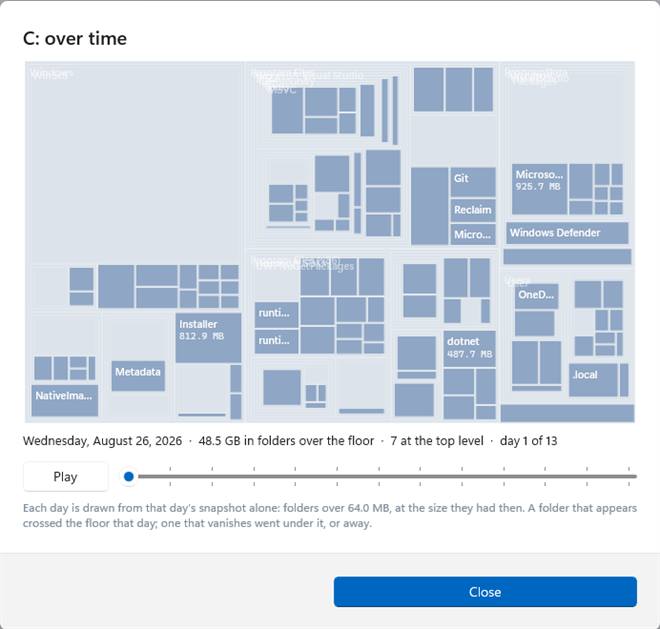
Time-lapse (Pro) — the daily snapshots played as a treemap, one day per step, so you watch where the disk went.
Retention rules (Pro) — "Downloads, 90 days": what sits in a folder untouched that long is staged for you each time the volume opens. Never deleted by a rule.
Similar photos and videos (Pro) — the same picture at three sizes, the same video re-encoded, found as one set.
Steam games on the rail with last played, and Uninstall through Steam. WSL and Docker disks with what is used inside and the slack — Compact (Pro) gives it back.
Disk health — the disk behind each letter, as it reports itself, on hover; an email when one predicts failure. A git checkout the remote holds all of counts as regenerable.
Compare with another PC (Pro) — the same folder on two of your PCs, side by side. FAT32, exFAT, BitLocker and Dev Drive read as they should. Settings on four cards, with a test email for the alerts.
Explorer says 12 GB. Reclaim says 40. Reclaim tells you why.
When folders add up to more than the volume has in use, the difference is data several files share — ReFS clones, hard links. Reclaim shows it as "shared between copies", and Measure on disk reads a folder's files to say what they really occupy.
One switch changes every figure in the window: the files' length, or what they occupy on disk.
What the regenerable folders inside a row add up to — not everything deletable, only what rebuilds from the disk.
How much a folder grew or shrank against last week's snapshot — or against any two days you pick, with a year of history, in Pro.
The newest write anywhere inside — so a 2019 photo folder touched by one thumbnail reads as today.
Everything that answers the question
The live index, every size mode, the map, search, export, the Explorer menu, the Steam and WSL cards, the disk's own health, themes and languages, and deleting what you find — one item at a time, Recycle Bin or permanent. Fourteen days of everything from first use; then Reclaim continues free.
Download — freeThe parts you repeat
Staging with quarantine and restore, and retention rules
The duplicate finder, with hard-link collapse — and similar photos and videos
Every user's space
A year of history: any two dates compared, and the time-lapse
Email alerts, and a weekly or monthly report
Compare with another PC · Compact a WSL disk · the command line, with --json
Three PCs on one code. No account. Servers? Reclaim Server — the same engine on every server, one console, a digest by email — $49.95 per server per year.
See pricesReclaim 1.0.72 for Windows
Reclaim-Setup-1.0.72.0.msi · 126 MB · signed by INNOVATIVE SOLUTIONS GRUP SRL · updates itself